Thursday, November 26, 2015

SaxLab - a vst that makes you a brass specialist

  The original SaxLab was a software instrument that, with a bit of work on the user's part, was capable of producing not just decent saxophone sounds (of the soprano, alto, tenor, bass and baritone variety), but also a pretty good approximation of a flute.  In truth, it's never really been bettered, but that hasn't stopped LinPlug from attempting to deliver some improvements in this update. For the most part, SaxLab 2 sticks to its predecessor's successful blueprint, but adds a number of features that are designed to lend a breath of fresh air to your projects.
This is a sample-based plug-in, and sounds – which are monophonic – are produced using three layers: Main deals with the pitch, Keys emulates the sound of the saxophone's metal keys being played, and Air covers breath and airflow sounds. You can balance the levels of these layers in SaxLab 2's interface.
Next up is the Body section, which contains a filter that modulates the sound using an envelope, an LFO and real-time MIDI controllers. There's also a Deviation setting, which ensure that every note sounds subtly different – as they would if they were being played by a real saxophonist.
SaxLab Plugin

    Then there are chorus and reverb processors, a tuning section and an easy-to-use MIDI Learn system. At first glance, little seems to have changed on the SaxLab interface, but investigate a bit more thoroughly and version 2's improvements reveal themselves. In the Envelope section, the Velocity to Envelope control has been replaced by an Enhance control (this adjusts the attack transients of notes), while the Volume, Keys and Air controls are now routed in parallel.
The Performance section, meanwhile, has been totally redesigned, and offers many more control sources and destinations to increase realism. The Growl effect is a welcome addition, while the LFO boasts a new waveshape and a better attack characteristic. In the Deviation section, there's a dedicated control for the Air parameter, while there's an improved Reverb algorithm in the Effects menu. Finally, the microtuning system now supports TUN files, and LinPlug has included its preset management system. SaxLab 2 doesn't look or feel like a massive update, but then it didn't really need to be. The improvements in this version aren't exactly eye-catching, but should please both new and existing users. The supplied presets sound pretty good out of the box – it's possible to get some really beefy growl in the lower registers, while soft, sweet top-end tones are also easy to produce – and if you spend some time getting to know the more advanced features of the software, the results get even better. While we can't really recommend using this plug-in for solo performances, it's a winner when employed as part of a mix. It's also refreshing to find a 'real instrument' emulation that doesn't require you to install a huge amount of sample files before you can use it. SaxLab 2 is undoubtedly a specialised product – casual fans of the instrument will enjoy using the presets in their ROMpler of choice – but if you need to use saxophone sounds regularly, it remains an excellent buy.

MIDI Controller - 101 guide for a beginner

 MIDI keyboard controllers are becoming more and more popular today, seeing that technology continues to improve and musicians everywhere are slowly beginning the migration process of switching to a digital setup. I know people who still abide by analog equipment for mixing and mastering, but still use their MIDI controller frequently for various functions in their studio. We’re huge fans of keyboards and although we still love vintage synths and what not, you just can’t beat the cost-effectiveness and overall usefulness of a keyboard that is custom depending on which virtual instrument you’re using, creating an endless amount of possibilities for sounds and effects. Let’s review the top 10 best MIDI keyboard controllers available today — both for those who want the best of the best or are on a budget and want the most affordable.


How to choose your MIDI keyboard controller

First thing’s first: you need to take a few valuable questions into consideration when you’re choosing your MIDI keyboard controller. Here are some important questions to ask yourself before taking a look at what’s out there:

What is your budget? This is the most important question to ask. There are numerous choices for any price range, from under $100 to $500 or more.
How many keys would you like your controller to be? There are numerous options, such as: mini-compact 25, 32, 37, 49 (the most popular), 61, or even 88 (the highest — the equivalent to a real piano).
What type of key-make would you like? Whether it’s synth-action, semi-weighted, full-weighted or equipped with aftertouch, it all comes down to preference.
Is portability important to you? If so, you need to keep the overall size into consideration.
Do you want your controller to have MIDI pads? A lot of keyboards coming out nowadays include drum pads, typically within the 8-16 count range with 3-4 possible banks.
Are any other functions desired? Such as knobs, faders, buttons, arpeggiators, mod and pitch bend wheels, or various other performance controls.
Does the software bundle included with the keyboards matter to you? Some come with hefty programs and VST’s while others do not.
Is there a brand preference? Akai, Alesis, Arturia, Novation and Korg are quite popular, but there are also some lesser known brands who make high-quality MIDI controllers.

Wednesday, November 25, 2015

AVID ProTools

AVID PROTOOLS

"if you have protools and you're thinking of just saving for a digi 002/3 or some other digi interface. Just get the protools 10" 
Protools 10 & 11 with the Avid-Interface

Sound: Well, you can't really characterise the sound of the DAW, its all based on the D/A conversion from the interface. However, with an iLok PT9 can operate as a stand alone edit/mix/master DAW and the sound coming out of my monitors directly from my computer's audio out is pretty good, I'd still like to trust the conversion from my interface rather than from whatever driver PT uses between it and the computer's audio out, I'm using a Macbook Pro's 1/8th" headphone out as the line into my monitors for this example. Typically my interface is an Echo Audio fire 8 into my monitors and there is certainly a higher level of clarity when the interface handles the conversion. This Product COMPLETELY helps me to achieve the sound I'm looking for. I've been using ProTools since 7.2/ 7.4 HD and LE. My home studio (LE) is really hooked up with PT9, backwards compatible with all of these versions of PT and it works with everything flawlessly, edits, mixing, mastering. I love it. still getting used to multitrack Beat detective but its great great great! one of the questions is how does it sound Live versus a recording. Its a DAW. But with a digi002/003 console you actually could just make all aux tracks and use the ins from the digi and route audio to other aux's that have reverbs and compression and parallel processing. 
So long as your comp can handle that...you could actually do some great live mixing with ProTools 9 and an interface with line ins/outs and a multichannel power amp. I've used PT9 in two different rooms with monitors (same echo audio interface, different sets of monitors) and with some sony headphones and just the laptop speakers, works well across all platforms. my only tip to make this product to sound better is more of a complaint with the Echo company, PT10 only recognises the outputs of my interface as valid outputs, which makes sense. but my audio fire won't route the signal out through the headphone jack so monitoring overdubs of some solo guitar stuff or what have you has become a tedious task. I've had to route signals to my other outputs of the audio fire to a mixer and then sub mix that stereo signal to an aux for headphones...which actually wound up being a good way to get multiple headphones to do tracking live. Again all of this is mostly due to the feature of the Echo not having the Headphone out being recognised as an "output" in PT.

Feature: ProTools is the best. Thats why its called Professional Tools...its the best 

Ease of Use: Its protools. Mix window- Mixer! edit window-(if you will) Tape deck, for edits 

Quality: PROTOOLS! thats all there is to it. Value: Worth it. 

Manufacturer Support: Never needed it. there was a hang up with getting the ilok authorization. Don't use Chrome ilok's website doesn't support it just us Safari or IE 

The Wow Factor: always have to stay on the up and up with technology these days....especially with music production... if you're a musician, learning the language of protools helps when you get into a real studio, if you're and engineer than this is a must have. 

Overall: Its Professional Tools...or Nofessional Tools

Sunday, November 8, 2015

My Favourite Audio Sites

Freebies:

http://hiphopmakers.com/ --- VST & Royalty Free Music

Monday, October 19, 2015

Zoom H5 - Tough & Durable

ZOOM H5 - Tough & Durable


The benefits to this H5 are:
Very small form factor. Hand held in the palm of your hand. 

Much better sound floor than the H4N.

Needs only two AA batteries. Unfortunately doesn't accept the new high capacity batteries

Modular mics that are pretty damn good

Gain control without zippers 

Real 4 channel XLR recorder/mixer with the optional plug in module

modular shotgun is actually pretty good!

Sound quality overall is pretty good! Definitely better than the 4N

If you need a recorder for both video shoots, and live concert situations, this is probably the best thing going without carrying a bunch of mics and a unit like the Tascam DR-60 or the Marantz PMD 661. A really good all around recorder. For the one recorder I'll carry when I need to do the job, it will be the H5.


For live recordings where I'm close to home, I'll bring the Marantz with it's better pre amps. For overall use on video shoots, I'll bring the H5n. For travel, it's a no brainer, the H5n. For live field recordings, I'll plug the Marantz into the board, and leave it be, attach the H5 to the video camera and do a dual recording with -12dB into the recorder, and then send it out to the camera. Will cover all bases that way. If, while shooting a concert, I get a chance to do an interview, will plug in a lav to the H5, and continue to spool out audio to the Marantz off the board while taping the interview on the H5. This will give me full coverage. Then when playing music with folks, can just set the H5 on a table top tripod and run it. Sort of a swiss army knife without tying up my cell phone recorder. 
Both the Marantz and the H5 are excellent performers with a slight edge to the Marantz on sound quality. If you want the best quality, then go with the Marantz or a better quality Tascam, like the 680 or just go buy a SD. They are the best quality sound and build. But for those of us in small outfits with a lack of audio engineering in the field, a H5 will not be a bad buy. 
The Tascam DR-60 is good, but you have to bring a mic, as it doesn't have one on the first generation units. But for what it does it does it well.


Basic operation is straightforward – you turn it on, select which inputs you want to record, set the level and press record, all of which is done using the front panel controls. The level meters start working as soon as you select the inputs and the protected volume controls make it easy to set the levels and get going. The screen is compact but uncluttered with all the information you need readily available, such as available recording time, battery status, file name, level meters (from -48dB to 0) and the chosen recording format (which defaults to 16-bit, 44.1kHz wav files). They’ve done away with the multi-track record mode and the effects unit, which, when used together, made the H4N a powerful multi-track recorder with various amp models and effects. My initial reaction is that this is a pity, but on reflection it’s sensible as very few people utilised this functionality.

You have a choice of two common file formats – MP3 and Wav. Wav files can be 16 or 24-bit with sampling rates of 44.1, 48 or 96kHz, although 96kHz is only available in stereo recording mode, as are MP3 files (which allow bit rates from 48k to 320kbps). Wav files are automatically time stamped and are thus Broadcast Wave Format (BWF) compliant. The H5 utilises SD and SDHC cards for storage and supports anything up to 32 gigabytes. The included 2GB card can store about 14 hours of stereo MP3s at 320kbps, three hours of stereo 16-bit/44.1kHz or an hour of stereo 24-bit/96kHz Wavs.

The pre-record function, when enabled, is continuously recording such that it can capture the two seconds before you press the record button, as well as an auto record function that can be set to record when the volume exceeds a user-defined level (and stop when it drops below a set level). 

And then there’s the potentially life-saving Backup-Record feature, which automatically records a duplicate set of stereo tracks that are 12dB lower than the original pair – although this only works when recording stereo Wav files at 44.1 or 48kHz. 

In operation the recordings are clean and clear. The default X/Y microphone capsule includes rugged rubber shock mounts, which help isolate handling noise and the X/Y configuration enables the capturing of a detailed stereo image while ensuring centre sources are clear and well defined; it can also handle sound levels up to 140dB SPL. 

The line inputs use the same high-quality preamp as the H6, and support professional line level input (i.e. +4dBu), which is an improvement on the H4N, whose balanced input was configured for -10dBV operation, which often meant you had to pad the output from professional gear (such as mixing desks) so as to not overload the inputs.

So overall it’s a very capable and straightforward portable recorder, equally comfortable perched on a mixing desk, in the palm of your hand or sitting on top of a DSLR camera (via the optional hot shoe mount adapter). The interchangeable capsules provide new levels of versatility and flexibility and the lengthy battery life make the H5 a very worthy successor to the much-loved H4N and a powerful handheld recorder in it’s own right.

- Roger Walker
19 Oct 2015

Monday, October 12, 2015

Dolby Atmos: the cool new kid in town

DOLBY ATMOS: the cool new kid in town


    Dolby Atoms is the new addition to the AV world. Experiencing the surround sound from this amazing setup is something magical to a layman. The whole new addition to the .1 (point one) concept which made this stand out from the others were the pair of speakers mounted on the ceiling or the upward firing speaker units(optional). But for a audio professional this opens up a whole new platform, by moving sound in a three dimensional form instead of just panning them around the front and rear speakers. It is achieved by a object-based processing. This allows engineers to explore and deliver the best theatrical experience ever. Dolby Atmos is definitely a useful tool to a content creator.
Pioneer Elite Series (Upward firing speakers)

Breaking it down

Dolby Atmos Setup:
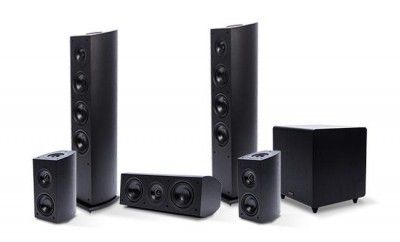
    Dolby Atmos is basically enabled by the new Atmos-equipped receivers that decode the content and delivers it to the speakers connected. This allows us to customise our setup from 5.1.2 to the current max 24.1.10 (Yep, that's 24 speakers, a subwoofer and 10 ceiling speakers.) 

Atmos speaker setup in 5.1 and 24.1

    Now, that’s a crazy setup which will cost a lot. Pioneer and Onkyo are offering such fairly priced, affordable Home Theatre in a Box (HTiB) as Atmos systems or as add-ons for your existing Home theatre setup.

Check out available systems:


Mixing in Dolby Atmos:

The basic approach in creating a Atmos mix are,
1. Mixing the existing stems
2. Premixing in Atmos
3. a Hybrid (combination of existing stems and the original source element)

    Mostly existing 5.1 source material is used for this approach. These stems usually consist of dialogue, music and FX (a huge clip list of Bg’s, sound design and foley).
Here the most important decision is making the choice, differentiating the elements for a traditional channel-based pattern, from the elements which are being highlighted by turning them into audio objects.
    According to several reports found online. Professionals prefer to do the premix in Atmos to have control of every element. But not every production has the luxury of doing the premix and the final mix on a Atmos stage. The premix is done in smaller rooms and edit suites with some plugins that help you to use the Atmos tools without the rendering and mastering unit hardware. The current VST supports unto 16 audio outputs used to mix in a Atmos configuration using 9.1 / 7.1 / 5.1 setup.
Finally when the mix is opened in a Atmos atmosphere, the mix reviles itself. Professionals prefer this workflow as the most effective and efficient way of working through the mix.

    Many State-of-the-Art Sound technology companies have made these plugins. AURO-3D is on top of the list. 
AURO-3D (Plugin Interface)
Check out AURO Technologies: http://www.auro-3d.com


   Even though I call this technology, the cool new kid in town. I would conclude by saying Dolby Atmos should evolve more; to offer the same experience to a home theatre audience, when considering the theatrical experience. I personally enjoy surround sound and was quite content with two excellent stereo speakers and a sub. Now I have a 5.1 and after doing all this research on Dolby Atmos, I’m seriously considering on getting a Atmos AV receiver and adding some speakers on the ceiling to get that rich surround sound effect.

- Roger Walker
Oct 12, 2015

Wednesday, October 7, 2015

headphones KILL

|headphones|KILL !!!

Since the invention of the Sony Walkman in the early 1980s, personal stereos have been ubiquitous. Being able to listen to your favorite music pretty much anywhere without bothering others accomplishes everything from passing the time while traveling to fueling workouts to discouraging chatty strangers. It’s the ultimate tune-out in a sometimes overly crowded world.

Young people, in particular, have an affinity for headphones and earbuds. The problem is, they also have an affinity for blasting their music, movies, or video games, and often don’t understand the long-term damage they could be doing to their hearing.

The National Institute of Health reports that 28 million Americans suffer from significant hearing loss–10 million of which were caused by noise exposure. Here’s what you need to know to keep your and your kids’ hearing intact:

Risk Factors for Hearing Loss
There’s no question that exposure to high decibels can cause hearing loss. High energy sound waves will over-stimulate and, eventually, kill the hair cells in the inner ear, with high-frequency cells usually being the first to go. Even if the cells aren’t completely killed, damage to them causes diminished hearing and tinnitus, which is that ringing you hear after a loud concert. Tinnitus can be permanent and debilitating.

Earbuds that nestle the speakers directly in your ears are the most dangerous, according to audiologists, because the unfiltered sound is closer to the delicate structures of the inner ear and can cause more damage, and faster, than equally loud ambient noise.

The Distraction Problem
Even if you have your music turned down, headphones or earbuds create a very real problem with distraction. Most runners wear them, which means they can’t hear ambient noise like cars or, frighteningly, attackers coming up behind them. It’s even more dangerous for cyclists to listen to music while riding, since they’re on the actual road with traffic. Even pedestrians who wear earbuds are at greater risk of an accident, not only because they can’t hear what’s going on around them, but also because music causes people to tune out their surroundings. It’s fine when you’re sitting on an airplane or a bus. But when you’re out and about, especially in the city, you need to be more alert than personal stereos allow.

Working Out with Headphones
Did you know that when you’re exercising, your hearing is even more susceptible to damage because the blood is flowing to your muscles, lungs, and heart and away from your ears? In addition, when you are working out in a loud environment, such as a gym or area with a lot of traffic, research shows you are likely to turn up the volume to drown out the ambient noise. This, combined with greater sensitivity of the ears is a recipe for hearing loss.
There’s one more thing to consider when working out with earbuds or headphones: scientists tell us that we’re more likely to be injured because music distracts from what’s going on in our bodies while we exercise. Sure, that’s one of the benefits—you can bear the discomfort of running a little better with Rihanna pumping through your head—but the music can also make you miss or ignore pain that could be a sign of real injury. In addition, music makes it hard to regulate how hard you’re working, unless your playlist is specifically designed for the optimum pace of each part of your workout, which makes it easy to overextend and burn out early.

Kids and Teens
Kids and teens in particular are in danger of noise-related hearing loss. Not only does music play a huge part in the lives of most teens, but they also tend to listen longer and louder than adults. According to a report in the Journal of the American Medical Association, hearing loss among teens had risen to nearly 20 percent of kids age 12 to 19 by 2006 (compared to 14.9 percent from 1988 to 1994). Experts warn that–even when it occurs in childhood–hearing loss is not reversible, and is more likely to progress with age.


Unfortunately, hearing loss in teenagers can affect more than just whether they hear you calling them for dinner. Compromised hearing has been shown to have a detrimental effect on both academic performance and social development. Researchers have also found that boys are more likely than girls to suffer hearing loss. If you have kids, consider investing in a device that locks the volume control at a healthy level to protect them.

- Roger Walker
Oct 07, 2015